
Quick answer: As a former middle school science teacher, I would use QuizRise Classroom to organize each class, share quizzes and study materials from the same source, choose between Study Mode, Exam Mode, and Custom access, and use Classroom Statistics to decide what I need to reteach next.
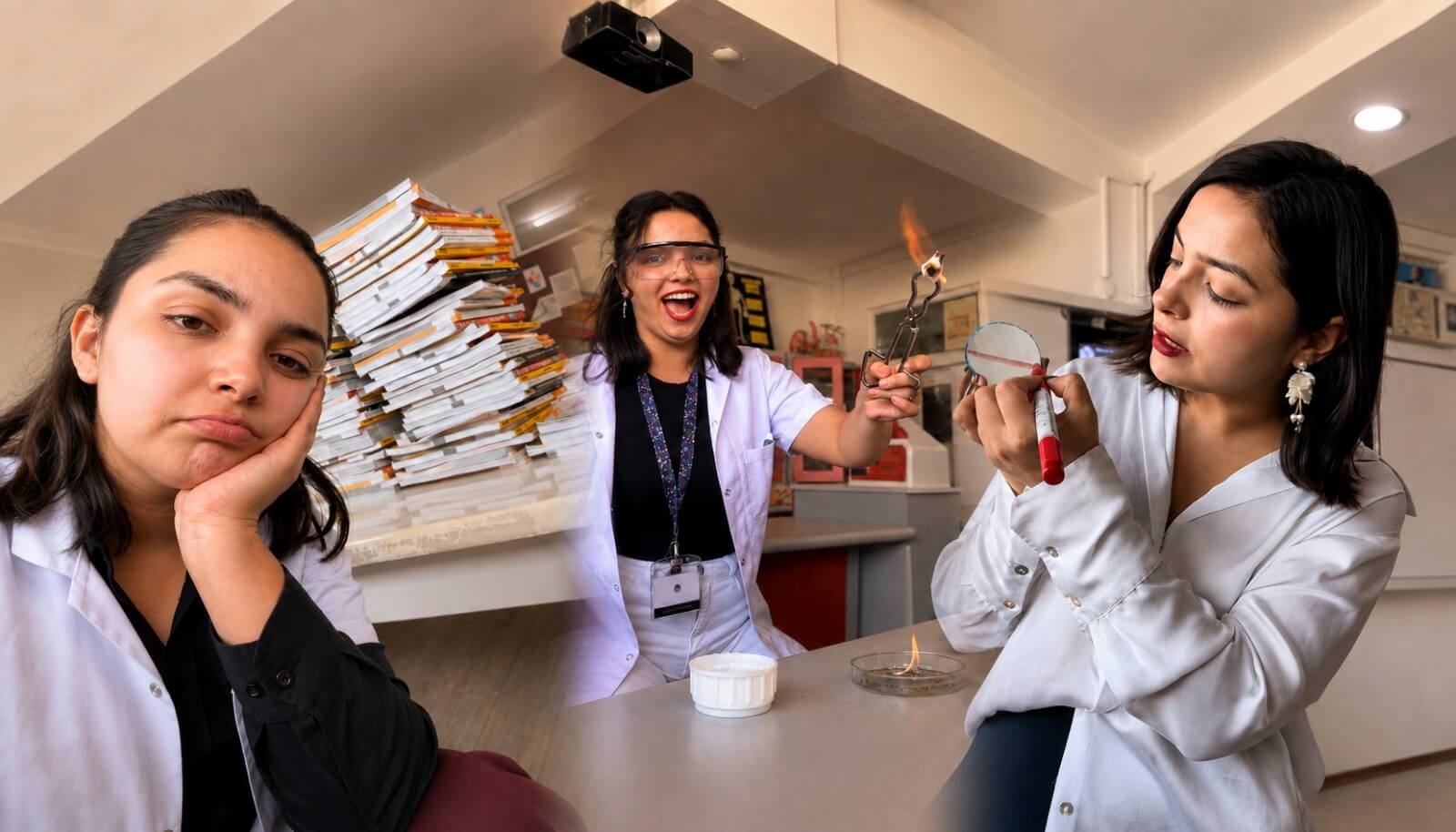
Hello, I am Hilal, a teacher. I worked for a while as a science teacher at a private school. Teaching is a profession with a very busy pace. When I was teaching, I often found myself rushing from one place to another. Since my subject was science, the work was not only about entering the classroom and explaining the topic.
My perspective in this article comes from 5 years of middle school science teaching in private schools and from preparing student-facing science content through Fenhilla.com. I am writing as someone who has had to plan lessons, check homework, prepare questions, and still make decisions with limited classroom time.
If I were entering the classroom again today, I would use QuizRise Classroom to follow my students’ learning process in a more organized way, share the content I prepared under one class, and reduce the time I spent on some repetitive teaching tasks.
When I planned an experiment, I had to prepare the materials before class, organize the laboratory, create experiment reports, and prepare evaluation questions. All of this meant serious preparation time before the lesson even started. At the school where I worked, I had only 3 hours of science class per week with each class. So I had to plan my time very carefully. There were topics I needed to teach, experiments we needed to do, test books we needed to solve, and homework I needed to assign and check.
But within all of this intensity, the most important question for me was still this:
Does each of my students really understand the topic?
My classes had about 25 students. During lesson time, it was not possible for me to check every question each student solved one by one or examine the reason behind every mistake in detail in the classroom.
When I assigned homework, I did not use only one source either. I gave my students work from four different sources. Then I collected those assignments and checked and signed them one by one during lunch breaks or outside school hours.
For me, it was never enough to answer only the question, “Was the homework completed?” I also tried to understand whether the student really solved it, whether they understood the topic, which questions they struggled with, what the reason for the mistake might be, or whether they had only checked the answer key.
Sometimes I became so focused while checking homework that I found myself writing explanations and small notes on the questions my students had answered incorrectly.
And imagine doing this for 7 different classes.
I wanted every student to learn the topic completely, but the time I had as a teacher was limited. That is why I kept asking myself the same question:
How can I follow my students’ learning process better while using my own time more efficiently?
Meeting QuizRise came from exactly this need
QuizRise became meaningful to me at the point where I was looking for solutions to these problems.
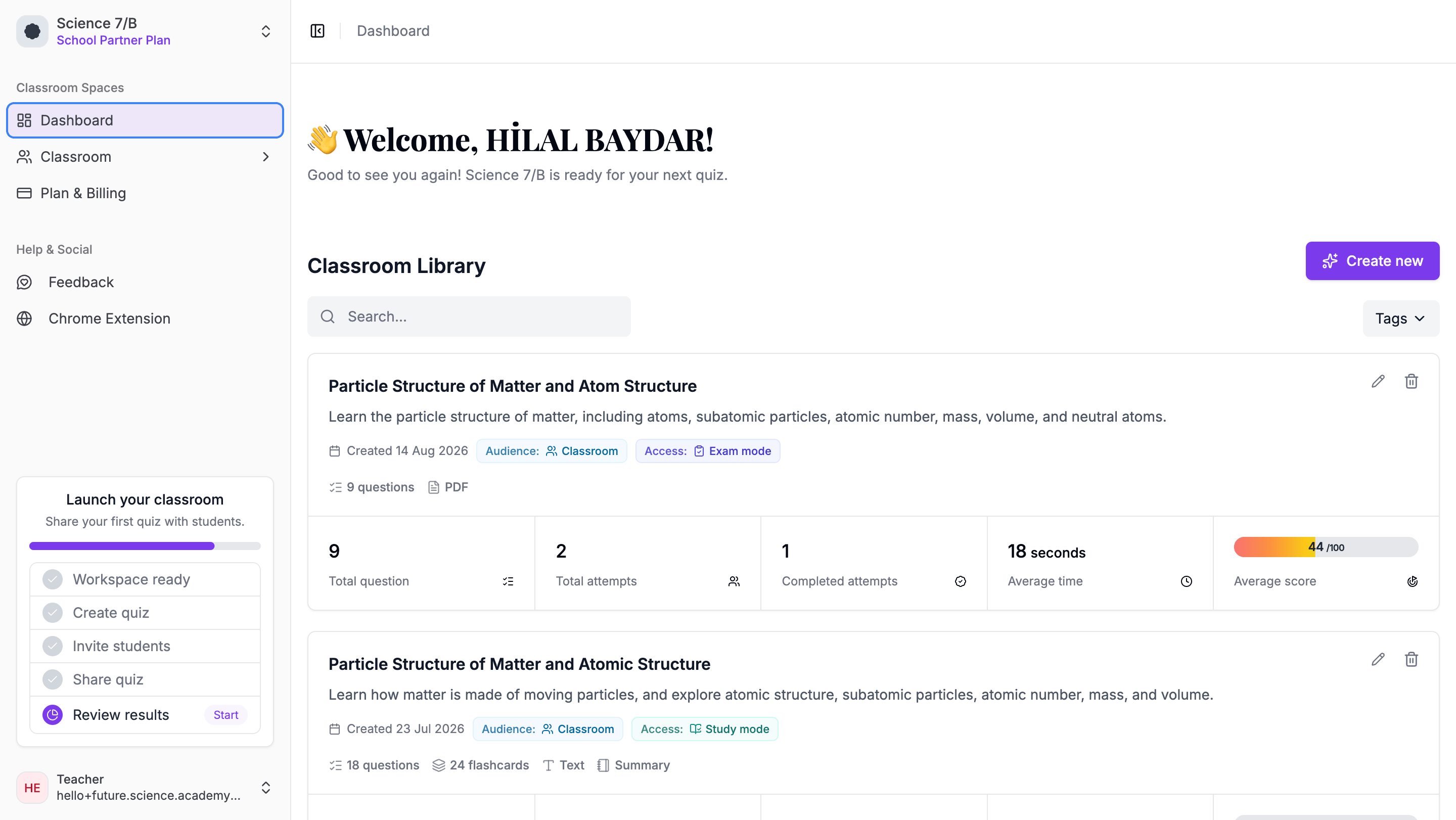
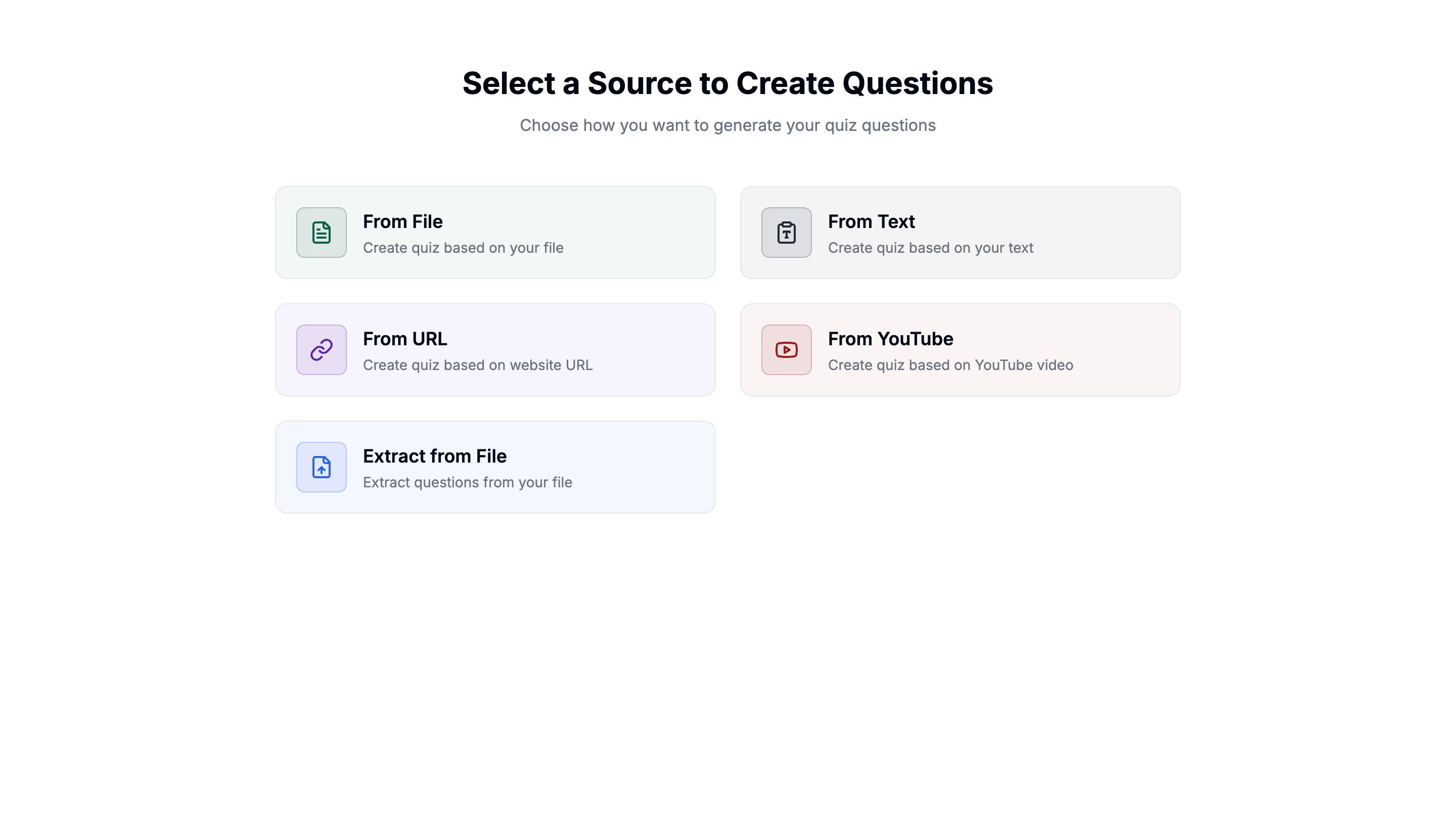
I already had teaching materials I used in class. These could be a PDF, lesson notes, a presentation, or sometimes even a YouTube video I wanted my students to watch. I could upload that content to QuizRise and create questions in the structure I wanted.
I could edit the generated questions according to my own students and the level of my lesson, change the questions I did not want, or quickly add a new question I had prepared myself.
It did not have to be fully digital either. If you are a teacher who prefers more traditional methods, you can print the quiz you created and distribute it in your classroom. For example, you can use a few questions at the beginning of the lesson to see your students’ prior knowledge, then do a short assessment on the same topic at the end of the lesson.
But as a teacher, the part that really interested me started after that:
Being able to use the content I prepared with my students on the same platform.
Creating a quiz is only the beginning
Today, there are many virtual classroom applications a teacher can use. But the point I find valuable in QuizRise Classroom is not only that I can invite my students to a virtual classroom. It is that the process of creating content, sharing it with my students, letting them study, and then analyzing their results happens on the same platform.
For example, I can prepare a quiz from a PDF or a YouTube video for my science lesson. From the same content, I can create study materials such as a Summary, Mind Map, and Flashcards for my students.
Then I can create my Classroom and invite my students. I can assign the work I prepared to the relevant class and decide which materials my students can see. After my students complete the work, I can follow their results and the overall state of my class through Classroom Statistics.
So for me, the process is no longer only:
Create content -> Prepare a quiz
It turns into a more complete learning process:
Create your content -> Share it with your class -> Give your student a chance to study -> Evaluate -> Analyze the results -> Shape your next lesson accordingly.
As a teacher, preparing a quiz is only the beginning. The real question is: how will I use the content I prepared with my students?
Will I send a separate link for every quiz? How will I follow who completed the quiz? If I have different classes, how will I organize the students? Can students study the topic before they move on to the quiz? When I look at the results, will I only see a score, or will I also understand the overall state of my class?
This is the lens I want to use to explain QuizRise Classroom.
Instead of giving you a long feature list, I will move step by step through this question:
“If I were entering the classroom again today, how would I use QuizRise Classroom with my students?“
1. First, I would create my class and invite my students
First, I would create a separate Classroom in QuizRise for each class I teach. For example, 8-A Science and 8-B Science.
This would let me follow the students, shared content, and results from different classes separately.
You can create multiple Classrooms from a single QuizRise account and invite both your students and the teachers you work with to those classes. If you are setting this up for the first time, the help guide on what classrooms are in QuizRise explains the basic classroom model.
I find this especially useful in schools where more than one teacher teaches the same class. For example, at our school, another teacher taught the topic explanation lessons for 7th grade, while I taught the question-solving lessons.
In a situation like this, both of us could be in the same Classroom. We could create quizzes, edit existing content, and work with the same student group. Instead of each teacher setting up a completely separate system, we would have a shared space where we could manage the same class together.
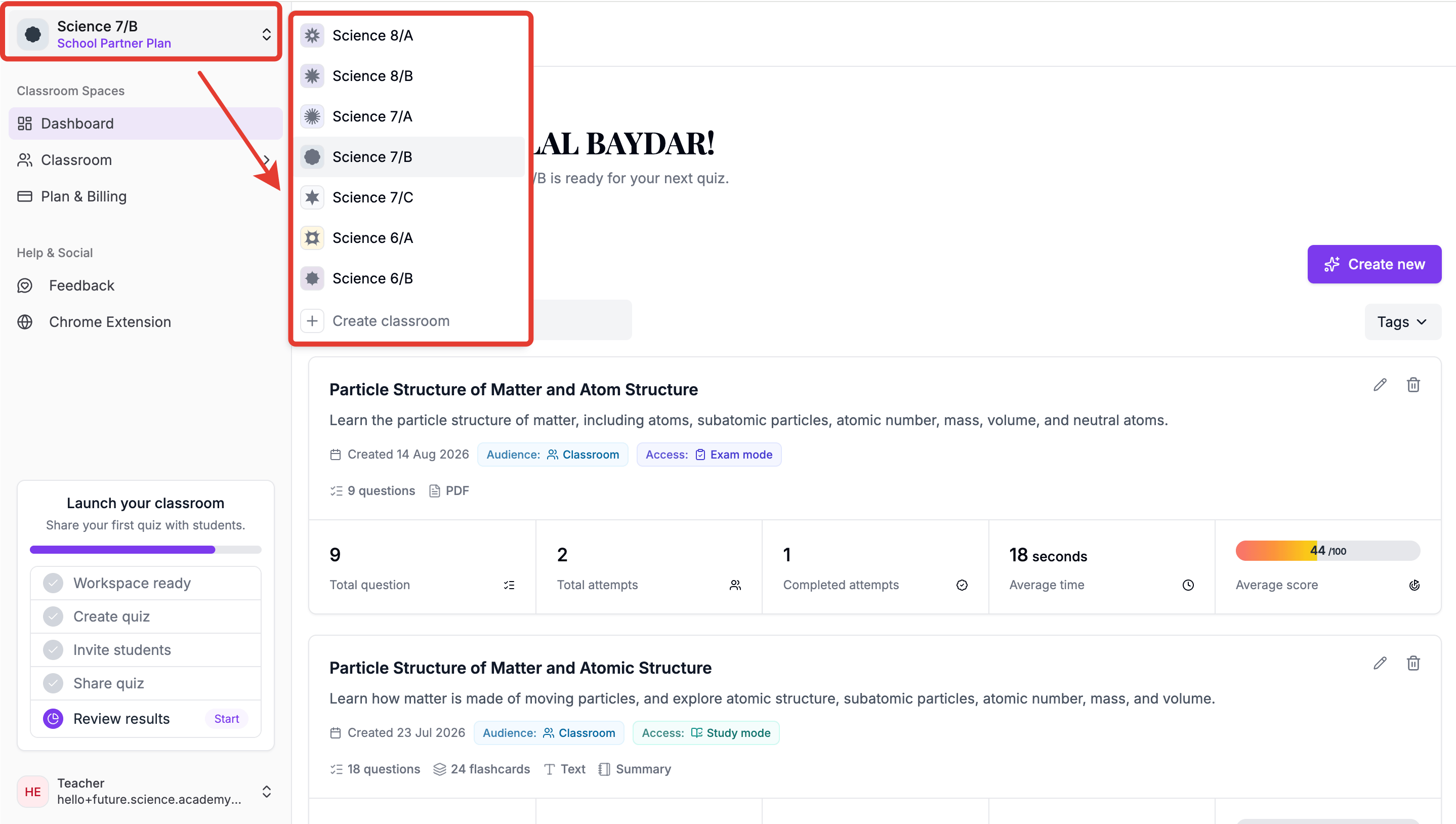
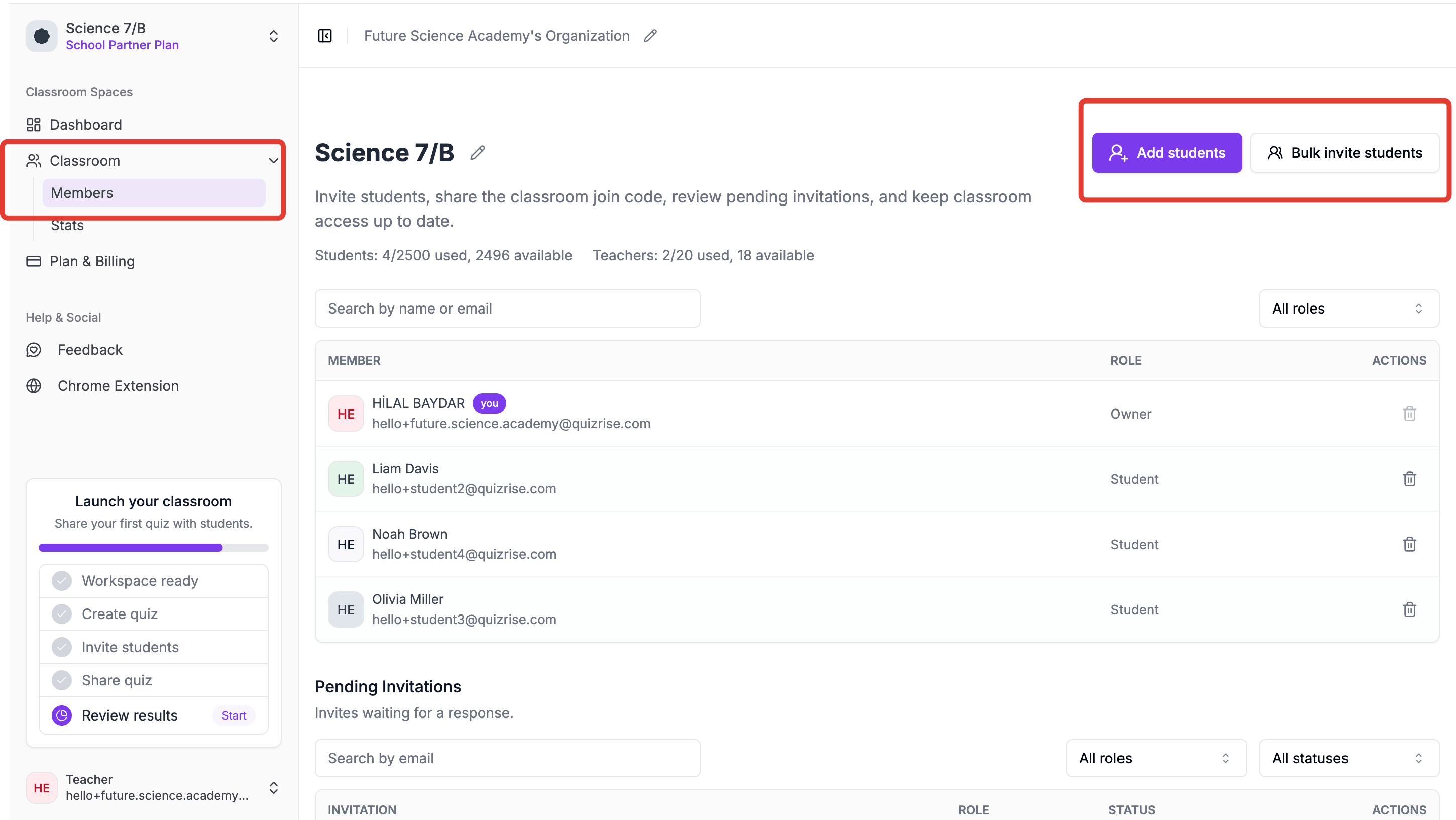
After creating my Classroom, I would invite my students. You can invite students one by one or in bulk through their email addresses, or you can share the class invitation link and let them join the Classroom.
Once students join the class, you can assign your new work directly to the relevant Classroom.
What is the difference between QuizRise Public and Classroom?
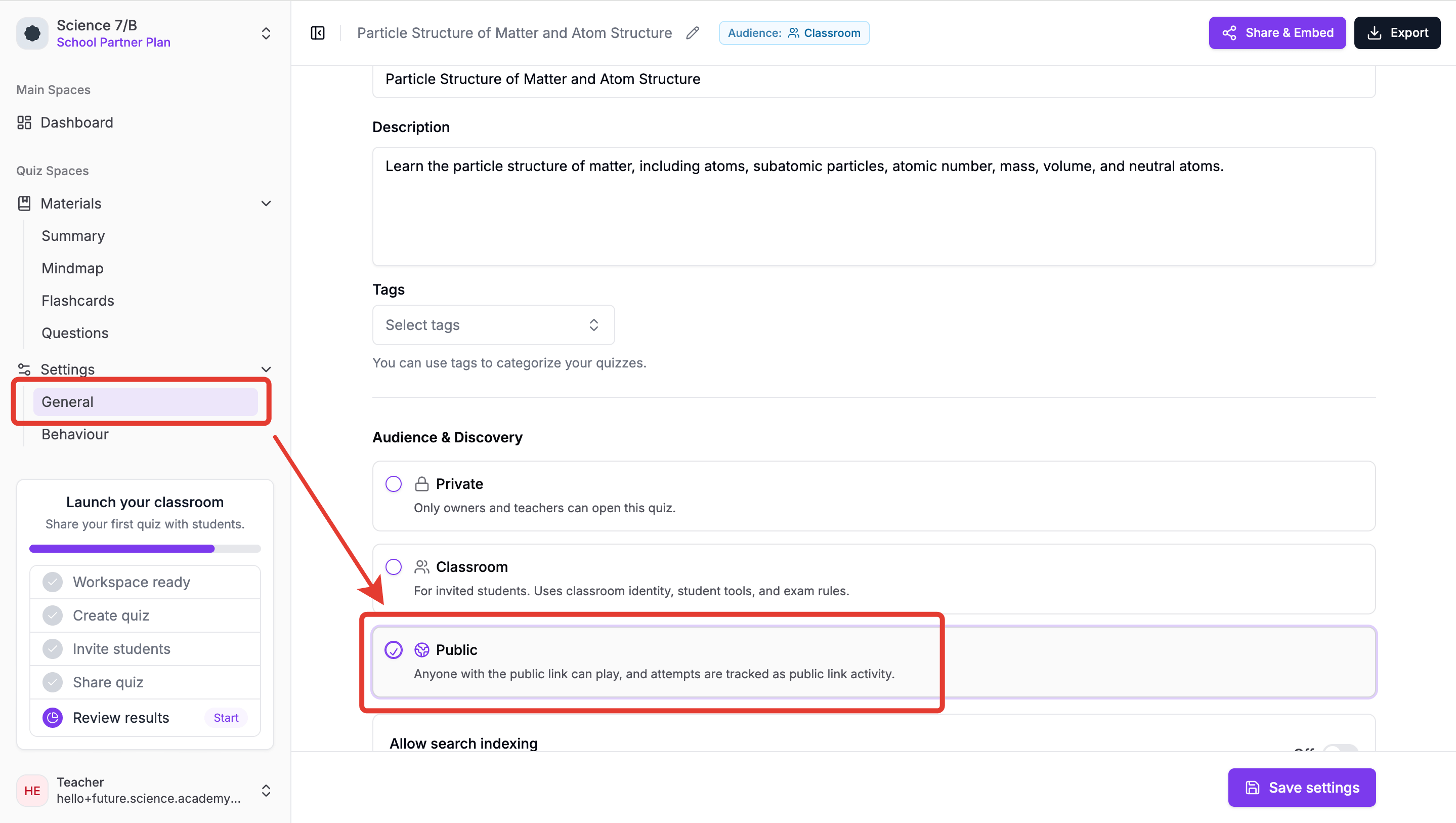
When sharing the work you create in QuizRise with your students, you can choose Public or Classroom sharing. The full Private, Classroom, and Public visibility guide explains the access rules, but here the important point is not which one is better. It is what purpose you have for sharing the work.
With Public sharing, people who have the link can join the quiz using a nickname and can participate in the same quiz more than once. They do not need to be registered in a class. For this reason, Public sharing is very useful when you want to share content with a broad audience.
For example, I used Public sharing in the topic summaries I published on my own website. By adding a quiz I created with QuizRise at the end of the content, I could help the students visiting my website evaluate themselves on that topic.
If you create educational content in addition to being a teacher, or if you have your own website, you can use Public sharing to embed your quizzes on your website.
But in a classroom environment where I want to follow my own students regularly, my preference would be Classroom sharing.
That is because students join the Classroom with their own accounts. This makes it much more organized to follow which student completed which quiz, what they studied, and their results on a student-by-student basis.
In Public sharing, I would need to review the analytics of the quizzes I shared one by one. In Classroom, I can evaluate classroom work and student performance together through Classroom Statistics.
For example, when I wonder how one of my students has been doing across the last few activities, instead of looking at only one quiz result, I can examine that student’s activities inside the Classroom.
Another practical difference appears during sharing. In Public use, I need to share a new link with my students for every new quiz I create. In Classroom, after my students join my class once, I can assign the quizzes and study materials I prepare directly to the relevant Classroom.
So in my own use, the distinction would be quite simple:
If I want to share a study activity with a broad audience, on my website, or with students outside my class, I would use Public. If I want to follow my own students regularly and manage the learning process by class, I would use Classroom.
2. What is QuizRise Classroom?
When explaining QuizRise Classroom, I actually want to talk about two real usage needs we heard from teachers.
Think of a teacher who has multiple classes and many students. They share the quizzes they prepared with students as links. After a while, when they want to review the results, it becomes difficult to follow which participation belongs to their own student, how many times the student joined the quiz, and how that student performed across different quizzes.
Because the need here is not only to share a quiz. It is to follow the learning process of a specific student group.
This is exactly one of the problems QuizRise Classroom tries to solve.
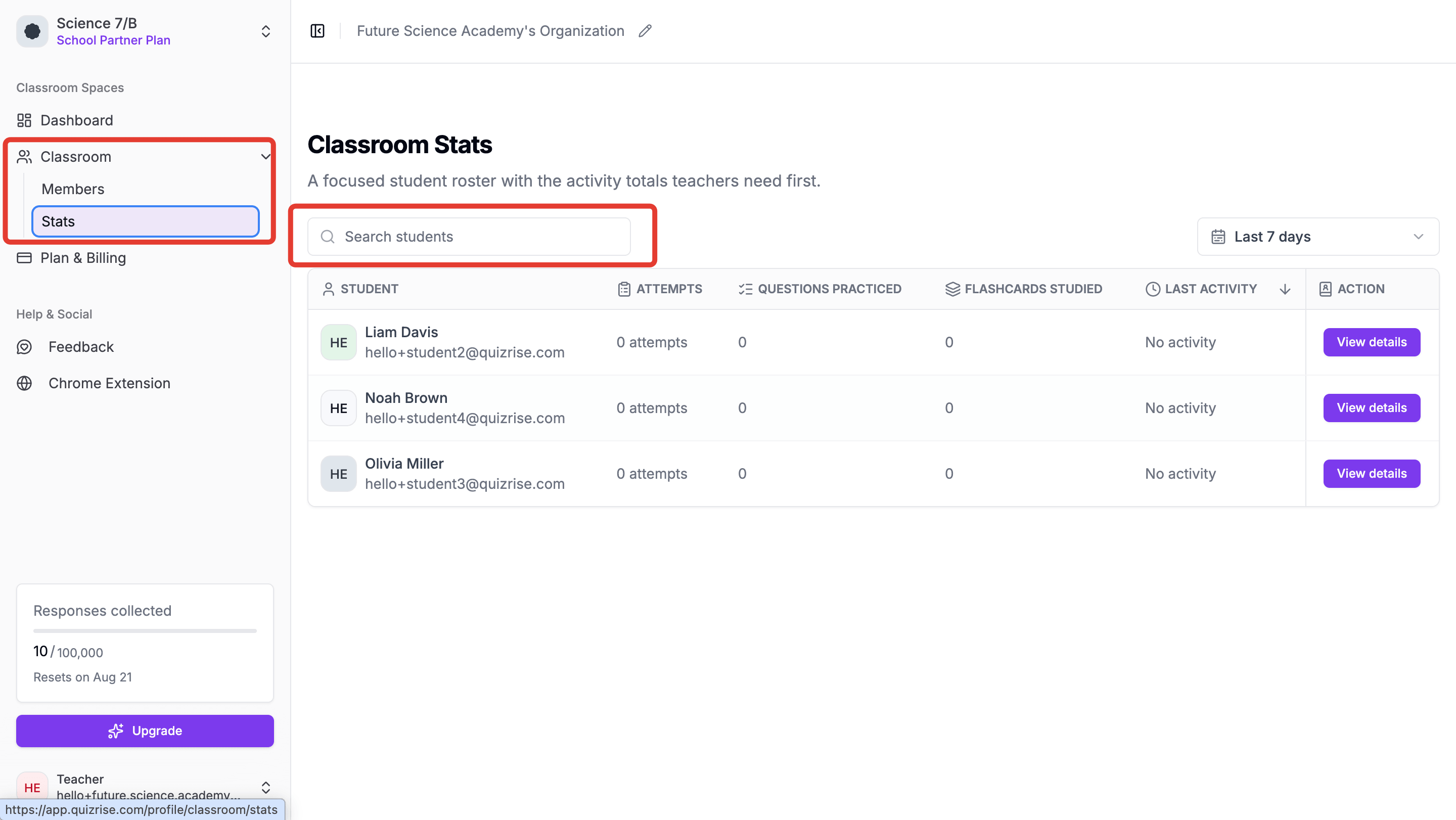
Once you invite your students to your Classroom, they join your class with their own accounts. After that, instead of sending the work you prepare one by one as Public links, you can share a quiz with classroom students and assign it directly to the relevant Classroom. This lets you follow your students’ activities and performance across different work by class and by student through Classroom Statistics.
But there was another need teachers shared with us:
“I send my student the quiz, but do I want them to see the source I used while preparing that quiz?”
Imagine that you prepared a quiz from a YouTube video or a PDF.
If your goal is for the student to learn and review the topic, you may want the student to access that source first, then use study materials such as Summary, Mind Map, or Flashcards, and then solve the quiz.
But if you are using the same content for assessment, this time you may not want your student to see the source, summary, or Flashcards while solving the quiz.
This is where one of my favorite points in Classroom appears:
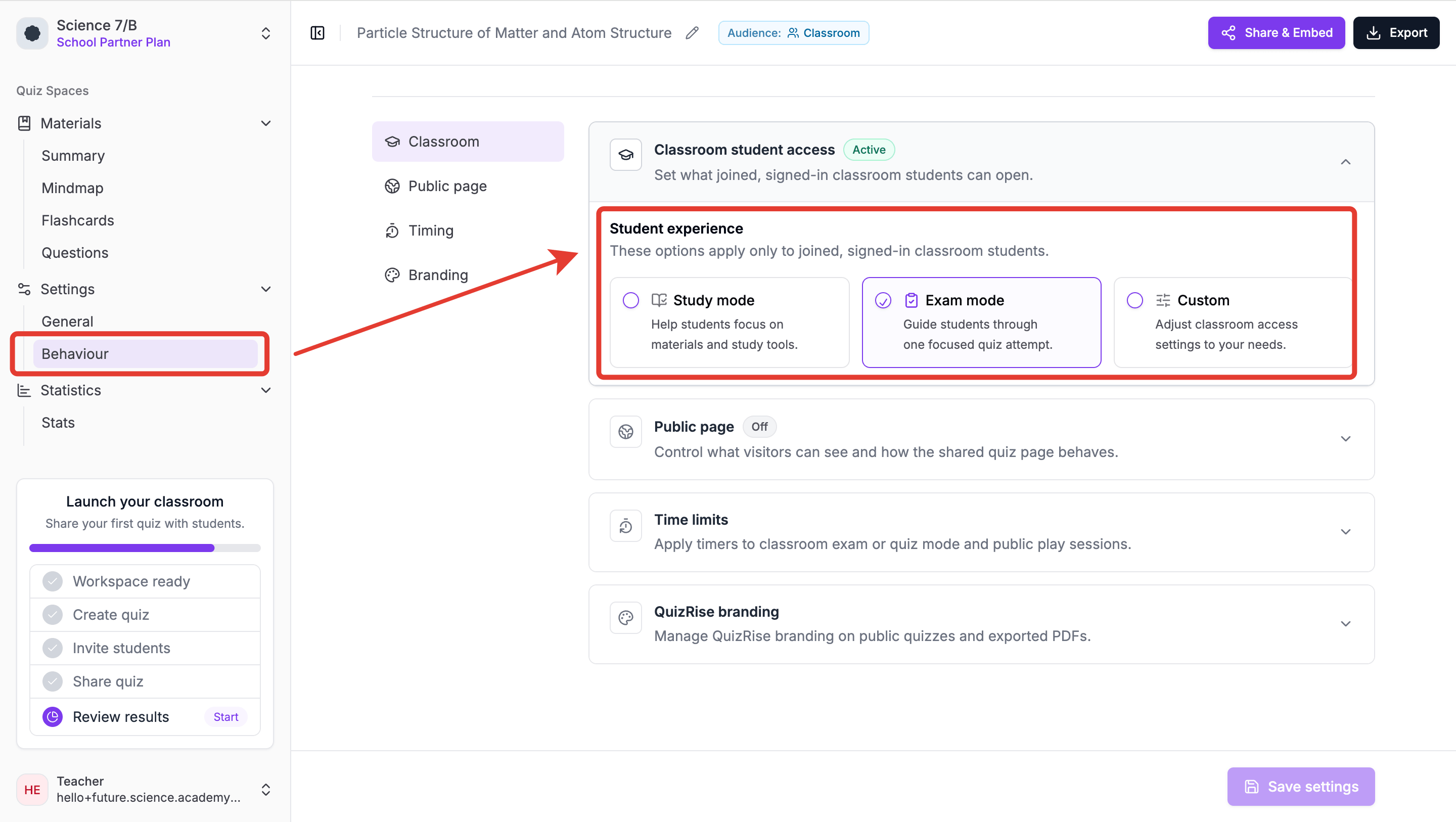
The teacher can decide not only what the student will solve, but also which materials the student can access while studying.
For example, if my goal is studying, I can open the source, Summary, Mind Map, and Flashcards for my students and use Study Mode. When I want to assess learning, I can limit access to these resources and continue with Exam Mode.
If I have a different lesson plan, I can use Custom settings and decide for myself which content my students can access.
That is why I do not see QuizRise Classroom only as “a virtual class where I add my students and send quizzes.”
For me, Classroom is a place where the teacher can answer these three questions from the same place:
Who am I sending this to? -> How will my student study? -> How will I follow their learning afterward?
As a teacher, this is exactly what I would expect from Classroom: not using more digital tools, but managing the work I already have to do in fewer places and in a more organized way.
3. So how would I use this in a real lesson?
Now let us make Classroom a little more concrete.
If I were teaching 8th grade science again and the topic that week was DNA and Genetic Code, I would not use QuizRise only to give my students a quiz at the end of the lesson.
First, I would upload the source I would use in class to QuizRise. This could be a PDF I prepared myself, lesson notes, or a YouTube video I wanted my students to watch.
After uploading the source, I would create questions according to my students’ level and the learning outcomes I wanted to measure.
I would definitely check the AI-generated questions with a teacher’s eye before sending them directly to my students. If necessary, I would change the level of the question, delete a question I did not want, or add my own question.
Because AI can save me time, but I am still the person who knows my students and my class level best.
This way, I could speed up the question preparation process that used to take separate time while keeping my teacher control over the content.
4. I would turn the same content into study materials, not only a quiz
One of the things that challenged me most when I was teaching was preparing different materials for the same topic.
I explained the topic, prepared summaries for my students, found questions, thought about review materials. Each of these required separate preparation time.
In QuizRise, I can create different study materials such as Summary, Mind Map, and Flashcards from the same source I upload.
For example, after uploading my source about DNA and Genetic Code, I could create a short summary for my students, show the core concepts on a Mind Map, help them review terms with Flashcards, and let them evaluate themselves with a quiz created from the same source.
So a single source can turn into a learning flow like this over time:
Lesson Source -> Summary -> Mind Map -> Flashcards -> Quiz
For me, the most important point here is not giving the student only a task that says “Solve this quiz.”
It is giving the student materials they can learn from and review with first, then giving them the chance to evaluate themselves.
5. I would decide which study materials my students can access
There is a very clear reality we see in the classroom:
Every student does not learn in the same way.
Some students want to review the topic by reading, while others can build connections more easily through a visual Mind Map. Some students like short reviews with Flashcards, while others want to test themselves directly by solving questions.
That is why, when assigning work to Classroom, I can decide which materials my students will be able to access.
For example, for a topic we have just covered, I can leave the source, Summary, Mind Map, and Flashcards open for my students. This way, the student is not only forced to solve the quiz. When they need it, they can return to the topic and review with the material that suits them.
But if I am using the same quiz on Friday for assessment, the situation changes.
This time, I may not want my student to access the source or study materials while solving the quiz.
This is where Study Mode, Exam Mode, and Custom options come in.
6. Using Study Mode for studying and spaced repetition
I would not want to keep giving my students quizzes only to see their scores. I believe the learning process should also include a space where the student can make mistakes, review, and progress at their own pace.
That is why I would use Study Mode especially for topic review.
For example, if I taught DNA and Genetic Code on Monday, I could ask my students to review the concepts with Flashcards on Tuesday or Wednesday and study with Study Mode.
Here, I find the idea of spaced repetition especially valuable.
Instead of a student studying a topic intensely one evening and then not seeing it for a long time, meeting the learned information again at certain intervals can support the learning process.
This is also consistent with education research guidance on study timing and retrieval. The Institute of Education Sciences practice guide on organizing instruction and study to improve student learning discusses spacing learning over time, and AERO’s spacing and retrieval practice guide explains how teachers can help students return to learning after the first lesson.
For me, the purpose of Study Mode is not only for the student to get a high score on an exam. It is for the student to review while learning and notice what they are missing.
7. I would evaluate my students with Exam Mode
After giving my students space to learn during the week, I may want to see how much they have learned.
At this point, I would use the same topic for assessment with Exam Mode.
In Study Mode, I focus on the student’s learning and review. In Exam Mode, I want the student to show what they have learned under the conditions I set.
For example, if I am doing a short topic assessment on Friday, I can limit my students’ access to source materials and have them complete the quiz through Exam Mode.
This way, a piece of content I prepared in QuizRise no longer becomes a quiz that is used once and then set aside.
The same topic can first be used for learning and review, then for assessment.
8. I would follow student performance with Classroom Statistics
At the beginning, I mentioned that when I was teaching, I checked my students’ homework one by one during lunch breaks.
The real reason I did this was not to put a check mark next to my students or only to see whether they had completed the homework. I was actually trying to understand where my student was struggling.
I would use Classroom Statistics for exactly this purpose.
After my students complete their work, I can look at the overall state of my class, see which students participated in the activity, and review their performance. I can also focus on a single student and follow their situation across different activities.
But for me, the real valuable question would be:
“What is my class telling me?”
For example, if most of my 25 students struggle with questions about DNA replication, I would not see this only as low student performance.
For me, it would also be a message:
“I need to return to DNA replication in my next lesson.”
I think the real value of analytics for a teacher appears here. Data can be used not only to evaluate students, but also to decide how I should plan my next lesson. This is close to the classroom idea behind formative assessment: the Education Endowment Foundation’s guidance on feedback describes how assessment information can help teachers understand learning and guide the next step.
What I would still decide myself as the teacher
Even with all of these tools, I would not leave the learning process completely to technology.
I would still decide the learning outcome of the lesson. I would still check whether the questions are appropriate for my students. I would still decide whether a low score means the student did not study enough, the question was too difficult, or I need to explain the topic again in a different way.
For me, QuizRise Classroom would not replace teacher judgment. It would give me a more organized way to see the work, reduce repetitive tracking, and make better use of the time I already have with my students.
9. What would my weekly QuizRise Classroom routine look like?
When I place all of this into one teaching week, my QuizRise Classroom routine would probably look like this:
| Day | What I would ask students to do | QuizRise Classroom setting | What I would check as a teacher |
|---|---|---|---|
| Monday | Review the source, Summary, and Mind Map after the DNA and Genetic Code lesson | Classroom shared materials | Whether students opened the materials and which concepts may need support |
| Tuesday | Review core concepts with Flashcards | Flashcards open | Which terms students need to revisit |
| Wednesday | Study at their own pace and make mistakes while reviewing | Study Mode | Whether students are using the study activity before assessment |
| Thursday | Return to the areas where they are missing something | Study Mode or Custom access | Which topics still look unclear before the quiz |
| Friday | Complete a short topic assessment | Exam Mode | Class participation, question performance, and students who may need follow-up |
| After assessment | Review the results before planning the next lesson | Classroom Statistics | What I should reteach, review, or explain differently |
So QuizRise Classroom would become part of this cycle in my lesson:
Teach -> Share -> Study -> Review -> Evaluate -> Analyze -> Teach again.
Why Classroom matters to me
When I think back to the period when I was teaching, I still remember the days when I checked my students’ tests one by one during lunch breaks.
I did this because I wanted to know whether my students were really learning.
If I were entering the classroom again today, I would not expect technology to replace the communication I build with my students or the decisions I make as a teacher.
On the contrary, I would want it to reduce the repetitive work I already have to do as a teacher so that I can spend more time with my students.
That is why I do not see QuizRise Classroom only as a virtual class where I add my students.
I see it as a place where I prepare my content, share it with my students, give them the chance to learn and review, evaluate them when needed, and then look at the results to shape my next lesson.
Because as a teacher, the real question was never:
“How many quizzes did I prepare?”
The real question was always:
“Did my student really learn?”
If technology can give me more time and a more organized learning process to help me find the answer to that question, then its real value begins exactly there.
Related QuizRise workflows for teachers
- Compare the best AI quiz generators for teachers by teaching workflow, question control, sharing, and results.
- Create questions from your lesson materials with the AI question generator.
- Turn PDFs into classroom-ready practice with the PDF quiz maker.
- Build quick review activities with the AI flashcard generator.
- Summarize long documents with the AI PDF summarizer.
Related classroom setup guides
- Learn what classrooms are in QuizRise.
- Use the Classroom Switcher and create classrooms.
- Invite students and teachers to a classroom.
- Compare Private, Classroom, and Public quiz visibility.
- Share a quiz with classroom students.
Frequently Asked Questions About QuizRise Classroom
What is QuizRise Classroom?
QuizRise Classroom is a QuizRise feature that helps teachers organize students into classes, assign quizzes and study materials to the right student groups, and follow student activity through Classroom Statistics.
Do students need an account to join QuizRise Classroom?
Yes. In Classroom use, students join the class with their own QuizRise accounts. This allows assigned work and results to be matched with the right student, so the teacher can follow progress across different activities.
What is the difference between QuizRise Public and Classroom?
Public sharing is useful when a quiz should be available to a wider audience through a link. Classroom sharing is designed for teachers who want to work with a specific student group, assign content to a class, and follow performance by class and by student.
Can I track student performance in QuizRise Classroom?
Yes. Classroom Statistics lets teachers review student participation and performance, look at the overall class situation, and examine how a single student is doing across different activities.
Can students use QuizRise Classroom for free?
Students who join a teacher's QuizRise Classroom can access the quizzes and study materials their teacher assigns according to the teacher's classroom settings. They do not need to buy a separate individual plan just to join assigned classroom work, while independent student use and account limits can vary by current plan.
How can a teacher track student progress after a quiz?
After students complete assigned classroom work, a teacher can use Classroom Statistics to review class participation, student performance, and question results. This helps the teacher decide which topics to reteach, which students may need support, and what to plan next.
When should a teacher use Study Mode or Exam Mode?
Study Mode is useful when the teacher wants students to review, make mistakes, and learn at their own pace with access to supporting materials. Exam Mode is useful when the teacher wants to limit access to those materials and evaluate what students have learned under clearer assessment conditions.